


What Is SEO? A Detailed Explanation
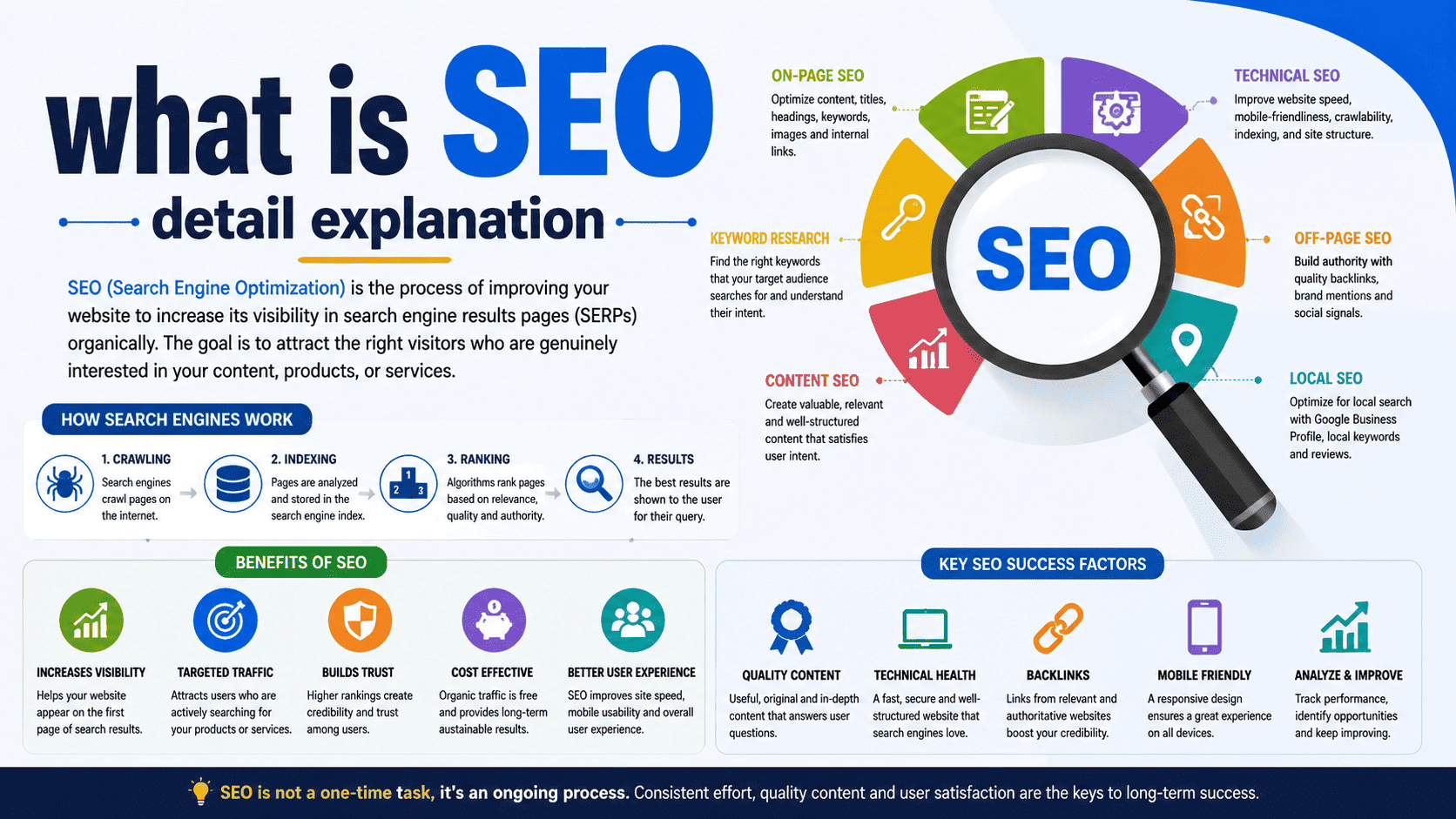
SEO, or Search Engine Optimization, is the process of improving a website so that search engines can better understand, crawl, index, and rank its pages for relevant searches. The main goal of SEO is to increase a website’s visibility in unpaid or “organic” search results and attract visitors who are genuinely interested in its products, services, or information.
For example, if you operate a web hosting company and someone searches for “best web hosting in India,” SEO can help your website become more visible for that search. However, SEO is much more than inserting keywords into pages. It involves content, website performance, technical configuration, user experience, internal linking, authority, and understanding what users actually want.
How Does SEO Work?
Search engines such as Google use automated systems to discover and evaluate web pages. Although the exact ranking systems are complex and constantly evolving, the basic process can be understood through four stages.
1. Crawling
Search engine crawlers, often called bots or spiders, discover web pages by following links and using other discovery mechanisms.
For example:
Homepage
   ↓
Hosting Services
   ↓
VPS Hosting
   ↓
VPS Hosting Guide
If search engine crawlers can easily access these pages, they have a better opportunity to discover and understand the site’s content.
2. Indexing
After discovering a page, a search engine analyzes its content and decides whether and how it should be stored in its index.
The search engine may consider:
- The subject of the page
- Text and headings
- Images and other media
- Links
- Structured data
- Page accessibility
- Overall quality and usefulness
A page generally needs to be indexed before it can appear in organic search results.
3. Ranking
When a user enters a search query, the search engine evaluates relevant indexed pages and determines which results are most useful for that particular search.
Different searches can produce completely different results because search engines attempt to understand relevance, intent, quality, context, and other signals.
4. Showing Search Results
The search engine then presents the results to the user.
Your objective with SEO is not simply to make every page rank for every keyword. Instead, you should create pages that are highly relevant to the searches your target audience is actually making.
Why Is SEO Important?
A website can have excellent products or services but still receive very little traffic if potential customers cannot find it.
SEO can help businesses:
- Increase organic visibility
- Attract relevant visitors
- Build brand awareness
- Generate leads
- Increase online sales
- Establish authority
- Reduce dependence on paid advertising
- Reach customers while they are actively searching
For example, someone searching for “how to migrate WordPress website” has already expressed an interest in website migration. A useful article answering that question can bring that person to your website and potentially introduce them to your hosting services.
Major Areas of SEO
SEO is usually approached through several interconnected areas rather than one single technique.
1. On-Page SEO
On-page SEO focuses on improving elements within individual web pages.
This includes:
- Page titles
- Headings
- Main content
- Keywords and related topics
- Internal links
- URLs
- Images
- Meta descriptions
- Content organization
- Search intent
Example
Suppose you create an article called:
“How to Choose the Best VPS Hosting for Your Website”
A strong page would clearly explain VPS hosting, discuss important selection criteria, answer common questions, and provide useful information rather than repeatedly inserting the phrase “best VPS hosting.”
2. Keyword Research
Keyword research means identifying the words and phrases that your target audience uses when searching.
For a web hosting business, potential searches might include:
- Web hosting
- Best web hosting
- Web hosting in India
- Cheap web hosting
- WordPress hosting
- VPS hosting
- Dedicated server
- Reseller hosting
- How to choose web hosting
However, simply finding keywords isn’t enough. You need to understand why someone is searching for them.
Understanding Search Intent
Search intent describes the user’s underlying purpose behind a search.
Informational Intent
The user wants information.
Example:
What is VPS hosting?
Commercial Investigation
The user is comparing possible solutions.
Example:
Best VPS hosting for small business
Transactional Intent
The user is ready to take an action such as purchasing.
Example:
Buy VPS hosting India
Navigational Intent
The user is trying to find a particular website or company.
Example:
Ehostpiya login
A successful SEO strategy creates content that matches the intent behind the search instead of simply targeting keywords.
3. Technical SEO
Technical SEO focuses on the technical aspects of a website that affect crawling, indexing, performance, and accessibility.
Important areas include:
Website Speed
A slow website can frustrate visitors and make it harder for users to interact with your site.
Performance improvements can include:
- Compressing images
- Using caching
- Reducing unnecessary scripts
- Optimizing databases
- Using a CDN
- Improving server response time
- Using modern image formats
- Removing unnecessary plugins
Mobile Optimization
A website should provide a good experience on smartphones and tablets as well as desktop computers.
This includes:
- Responsive design
- Readable text
- Properly sized buttons
- Easy navigation
- Fast loading
- Content that fits smaller screens
HTTPS
HTTPS encrypts communication between the visitor and website and is an important basic security standard for modern websites.
XML Sitemap
An XML sitemap provides search engines with information about URLs that are important on a website.
Robots.txt
The robots.txt file can provide crawling instructions to search engine bots.
For example:
User-agent: *
Disallow: /admin/
It must be configured carefully because accidentally blocking important pages can prevent them from being crawled.
4. Content SEO
Content is one of the most important components of SEO.
Good SEO content should be created primarily for people, not simply for search engines.
High-quality content should:
- Answer the user’s question
- Provide useful information
- Be original and accurate
- Be easy to read
- Demonstrate appropriate expertise
- Cover the subject adequately
- Avoid unnecessary repetition
For a web hosting company, useful content could include:
- What Is Web Hosting?
- What Is VPS Hosting?
- Shared Hosting vs VPS Hosting
- What Is a Dedicated Server?
- How to Speed Up a WordPress Website
- How to Migrate a Website
- How to Secure WordPress
- How to Choose a Hosting Provider
This type of content can attract people who are researching problems related to your products and services.
5. Off-Page SEO
Off-page SEO focuses on signals and activities outside your own website.
One important area is backlinks.
A backlink occurs when another website links to your website.
For example:
Industry Website
       ↓
   Your Website
A relevant and trustworthy website linking to your content can help search engines discover your pages and may contribute to your site’s reputation.
However, SEO is not a numbers game where thousands of low-quality links are necessarily better than a few relevant ones.
Avoid manipulative link-building practices, link schemes, and spam.
6. Internal Linking
Internal links connect one page of your website to another page on the same website.
For example:
Web Hosting → WordPress Hosting → WordPress Security → WordPress Backup Guide
Internal linking helps visitors discover related information and helps search engines understand the relationships between pages.
Use descriptive anchor text that tells users what they can expect when they follow the link.
7. Image SEO
Images can also contribute to a better search and user experience.
Good image optimization includes:
- Compressing large images
- Using suitable file formats
- Providing useful alternative text when appropriate
- Using descriptive filenames
- Implementing responsive images
- Avoiding unnecessarily large files
For example:
wordpress-hosting-guide.webp
is more descriptive than:
IMG00123.webp
Image optimization also helps reduce page weight and improve loading performance.
8. Local SEO
Local SEO is particularly important for businesses serving specific geographic areas.
For example, a hosting company targeting Indian customers might create useful content around relevant searches such as:
- Web hosting in India
- WordPress hosting India
- VPS hosting India
- Hosting for Indian businesses
Local SEO can also involve maintaining accurate business information, managing a Google Business Profile where appropriate, earning genuine reviews, and developing relevant local content.
9. User Experience and SEO
SEO should not be viewed as an activity performed only for search engines.
A website must also satisfy the people who visit it.
A good user experience generally includes:
- Fast loading pages
- Clear navigation
- Simple website structure
- Readable content
- Mobile-friendly design
- Helpful information
- Clear calls to action
- Minimal distractions
If SEO brings visitors to your website but they cannot find the information they need, the traffic may have little business value.
What Are Core Web Vitals?
Core Web Vitals are a set of metrics used to evaluate important aspects of page experience.
They include:
LCP — Largest Contentful Paint
Measures how quickly the main content of a page becomes visible.
INP — Interaction to Next Paint
Measures how responsive a page is when users interact with it.
CLS — Cumulative Layout Shift
Measures unexpected movement of page elements during loading.
Improving these metrics can contribute to a better user experience, but good Core Web Vitals alone do not guarantee high search rankings.
What Is a Meta Title?
A title tag helps describe the subject of a web page and can appear as the clickable title in search results.
Example:
Best VPS Hosting in India | Ehostpiya
A good title should be:
- Relevant to the page
- Clear
- Descriptive
- Attractive to searchers
- Naturally written
Avoid creating misleading titles simply to attract clicks.
What Is a Meta Description?
A meta description provides a short summary of a webpage.
Example:
Discover reliable VPS hosting with high performance, scalable resources, security features, and expert support for growing websites.
Meta descriptions can influence how a search result is presented and may encourage users to click, although they are not a direct guarantee of higher rankings.
What Are Backlinks?
A backlink is a hyperlink from another website pointing to your website.
For example:
Website A
   |
   |---- links to ---->
   |
Website B
If Website A is relevant and trustworthy, its link may provide useful authority and referral traffic to Website B.
Good ways to earn links include:
- Publishing original research
- Creating useful guides
- Producing valuable resources
- Digital PR
- Industry partnerships
- Creating content people naturally want to reference
The focus should be on earning legitimate, relevant links rather than generating artificial ones.
What Is Schema Markup?
Schema markup is structured data that helps search engines understand specific information on a page.
It can describe content such as:
- Products
- Organizations
- Articles
- Events
- Local businesses
- Reviews
- FAQs
For example, a product page can provide structured information about the product, price, availability, and other attributes.
Structured data can make pages eligible for certain enhanced search features, although implementing it does not guarantee that those features will appear.
SEO vs Paid Advertising
SEO and paid search advertising are different strategies.
| SEO | Paid Advertising |
|---|---|
| Primarily focuses on organic visibility | Requires advertising spend |
| Results can accumulate over time | Can generate traffic quickly |
| Requires ongoing optimization | Requires ongoing budget |
| Content and authority are important | Ad targeting and bidding are important |
| Traffic can continue after content is created | Traffic generally stops when campaigns stop |
Many businesses use both strategies together.
Common SEO Mistakes
New website owners often make mistakes such as:
Keyword Stuffing
Repeating keywords unnaturally throughout a page.
Duplicate Content
Publishing substantially duplicated content across multiple pages without a useful reason.
Buying Spam Links
Purchasing large quantities of low-quality or manipulative backlinks.
Ignoring Technical SEO
Having broken links, indexing problems, slow pages, or poor mobile usability.
Writing Only for Search Engines
Creating content that contains keywords but does not actually help readers.
Ignoring Search Intent
Targeting a keyword without understanding what the person searching actually wants.
Neglecting Existing Content
Publishing new articles while allowing older valuable pages to become outdated.
How to Build an SEO Strategy
A practical SEO strategy can follow these steps:
1. Understand your target audience
Determine who you want to reach and what problems they have.
2. Perform keyword research
Identify relevant searches and group them according to their intent.
3. Analyze competing pages
Study what successful pages cover and identify opportunities to provide something more useful or different.
4. Create valuable content
Build pages that genuinely answer user questions and satisfy their intent.
5. Optimize your pages
Improve titles, headings, URLs, internal links, images, and content structure.
6. Fix technical problems
Improve crawling, indexing, mobile usability, security, and performance.
7. Build website authority
Promote useful content and earn relevant mentions and backlinks.
8. Monitor results
Use tools such as Google Search Console and analytics platforms to understand traffic, queries, indexing, and conversions.
9. Improve continuously
SEO is an ongoing process. Search behavior, competitors, technology, and your own website all change over time.
How Long Does SEO Take?
SEO does not normally produce guaranteed results overnight.
The time required depends on:
- Website age
- Competition
- Industry
- Content quality
- Website authority
- Technical condition
- Search demand
- Existing rankings
- SEO strategy
- Consistency of implementation
A new website competing in a highly competitive market may need substantial time and effort before achieving strong organic visibility.
Be cautious of anyone promising guaranteed #1 Google rankings within a specific number of days.
How to Measure SEO Success
SEO success should not be measured only by keyword rankings.
Important metrics include:
- Organic traffic
- Search impressions
- Search clicks
- Click-through rate
- Keyword visibility
- Indexed pages
- Leads
- Sales
- Sign-ups
- Conversion rate
- Revenue from organic traffic
For a business website, conversions and revenue are often more meaningful than traffic alone.
For example, receiving 10,000 visitors who never become customers may be less valuable than receiving 1,000 highly targeted visitors who generate 100 leads.
SEO in Simple Terms
Imagine your website is a shop located in a huge city.
- Website: Your shop
- Search engine: A system helping people find shops
- Keywords: What customers search for
- Content: Information and products you provide
- Technical SEO: Making the shop accessible and well organized
- Backlinks: Recommendations from other businesses
- User experience: How easily customers can use your shop
- SEO: The overall process of making your shop easier to discover and more useful
The ultimate purpose of SEO isn’t simply getting more visitors. It is about getting the right visitors—people who are genuinely interested in what your website offers.
Final Takeaway
SEO is a long-term digital marketing strategy that combines useful content, technical optimization, search-intent research, website usability, internal linking, authority building, and continuous analysis.
A successful SEO strategy doesn’t attempt to manipulate search engines. Instead, it focuses on creating a website that is easy to discover, easy to understand, technically accessible, trustworthy, and genuinely useful to visitors. Over time, this can improve organic visibility, attract targeted traffic, and support sustainable business growth.