
Why Your Website Is Slow and How to Fix It
Website speed has become an essential part of running a successful website. When pages take too long to load, visitors may leave before the content appears, customers may abandon purchases, and search performance can suffer.
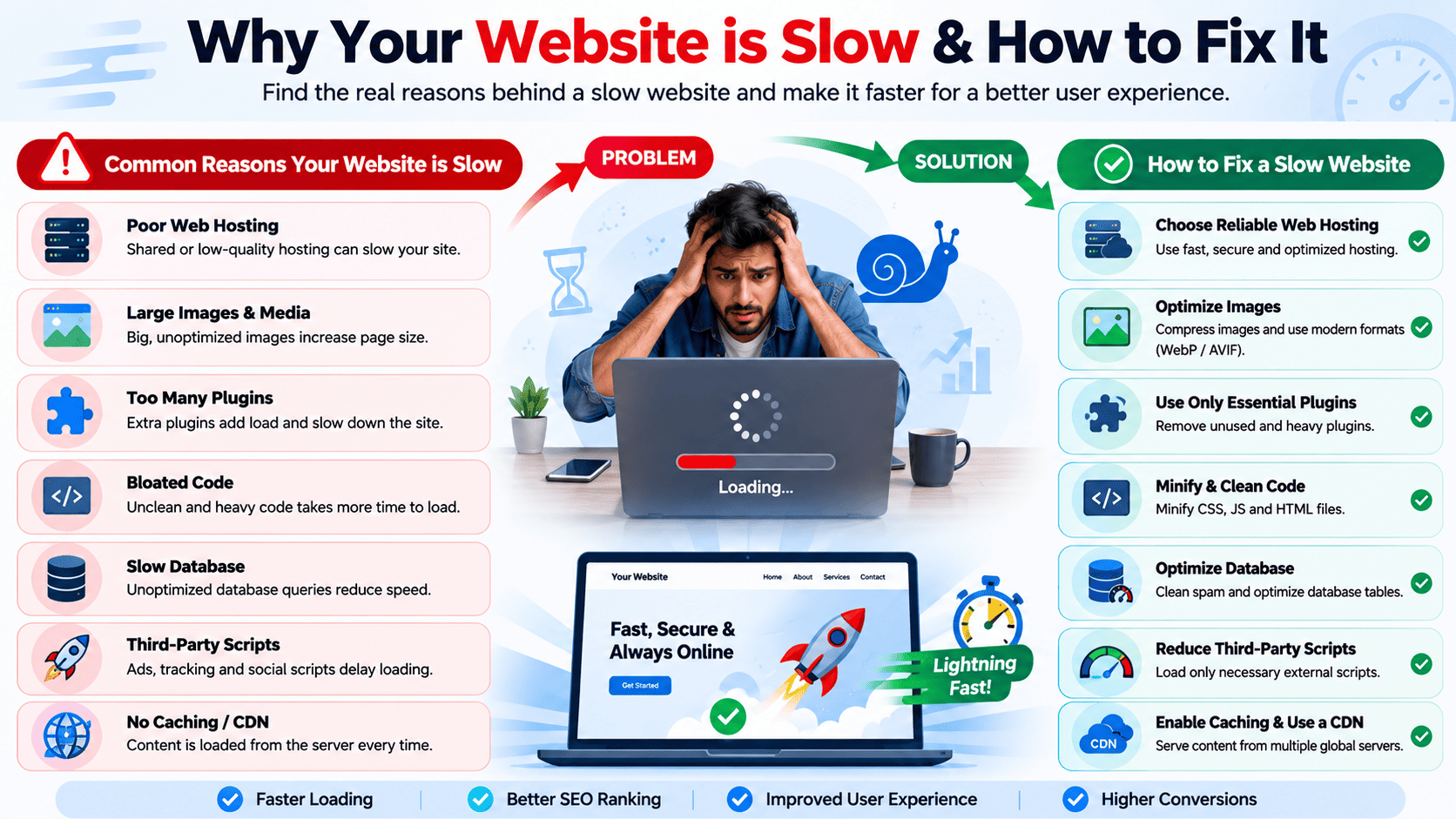
A slow website does not always mean you need a more expensive hosting plan. The problem can come from large images, inefficient code, excessive plugins, database issues, poor caching, slow server response times, or third-party services.
This guide explains the most common reasons websites become slow and practical ways to improve performance.
Why Website Speed Matters
Website speed affects much more than user experience.
A fast website can help you:
- Provide a better visitor experience
- Reduce page abandonment
- Improve mobile usability
- Increase conversions
- Improve website engagement
- Reduce server resource consumption
- Support better search-engine performance
Even a few seconds of additional loading time can make a website feel significantly less responsive.
1. Your Hosting Server Is Too Slow
Your hosting environment plays an important role in website performance.
If the server takes a long time to respond before sending the first byte of the page, the problem may be related to:
- Limited CPU resources
- Insufficient RAM
- Overloaded shared hosting
- Slow storage
- High server load
- Poorly configured software
- Physical server distance from visitors
How to Fix It
Start by checking your hosting account’s resource usage.
If your website frequently reaches CPU, memory, or process limits, consider:
- Optimizing the website
- Reducing unnecessary processes
- Using caching
- Upgrading the hosting plan
- Moving to VPS or dedicated hosting when appropriate
A hosting upgrade should be considered after basic optimization—not used as the only solution.
2. Large and Unoptimized Images
Images are often among the largest files loaded by a webpage.
Uploading a 5 MB photograph when the website only needs a few hundred kilobytes can significantly increase loading time.
How to Fix It
Optimize images before uploading them.
Use modern formats such as:
- WebP
- AVIF
Also:
- Resize images to their actual display dimensions.
- Compress images.
- Avoid uploading unnecessarily high-resolution photos.
- Use responsive images for different screen sizes.
- Enable lazy loading for images below the initial viewport.
For example, a blog thumbnail displayed at 400 × 250 pixels does not normally need to be uploaded as a massive 6000 × 4000 pixel image.
3. Too Many Plugins
WordPress and other CMS platforms make it easy to install plugins and extensions.
However, installing dozens of unnecessary plugins can increase:
- PHP processing
- Database queries
- JavaScript
- CSS files
- Background tasks
- Server resource consumption
Some poorly coded plugins can have an even greater impact than several lightweight plugins combined.
How to Fix It
Review your installed plugins regularly.
Remove plugins that:
- You no longer use
- Duplicate another plugin’s functionality
- Are poorly maintained
- Cause conflicts
- Consume excessive resources
Do not simply deactivate unnecessary plugins if you no longer need them. Remove them after confirming that they are not required.
4. Too Much JavaScript
JavaScript can add interactive features to a website, but excessive JavaScript can delay page rendering.
Large JavaScript bundles may require:
- Additional downloads
- Parsing
- Compilation
- Execution
This can be especially noticeable on mobile devices.
How to Fix It
Consider:
- Removing unnecessary scripts
- Minifying JavaScript
- Loading non-critical scripts later
- Using
deferwhere appropriate - Splitting large JavaScript bundles
- Removing unused libraries
- Reducing third-party scripts
Only load JavaScript when the page actually needs it.
5. Excessive CSS
Large CSS files can also slow down page rendering.
A website may contain styles for pages, components, and features that are no longer used.
How to Fix It
You can improve CSS performance by:
- Removing unused CSS
- Minifying stylesheets
- Combining files where appropriate
- Loading critical CSS efficiently
- Avoiding unnecessary frameworks
- Reducing duplicate styles
The goal is to deliver only the CSS required for the current page.
6. Your Website Has Too Many Third-Party Scripts
Third-party services can add useful functionality, but each external script can introduce additional requests.
Examples include:
- Analytics
- Advertising
- Live chat
- Social media widgets
- Tracking systems
- Embedded videos
- Marketing tools
- Customer-support tools
If several services load simultaneously, the browser may need to contact many external servers before the page becomes fully interactive.
How to Fix It
Review all third-party integrations.
Remove services you do not actually need and consider loading non-essential scripts only after the main content has become usable.
7. No Page Caching
Without caching, the server may need to generate the same page repeatedly for different visitors.
For a website with mostly static content, this can waste server resources.
How to Fix It
Implement appropriate caching.
Depending on your platform, you may use:
- Full-page caching
- Browser caching
- Object caching
- Server-side caching
- CDN caching
For WordPress, a properly configured caching solution can significantly reduce server processing time.
8. Your Database Is Too Large or Inefficient
Dynamic websites often depend on databases.
Over time, databases can accumulate:
- Old revisions
- Temporary data
- Expired sessions
- Spam comments
- Unused records
- Plugin-generated data
Poorly optimized database queries can also increase response times.
How to Fix It
Regularly maintain the database.
Depending on your application, consider:
- Removing unnecessary data
- Cleaning expired records
- Optimizing database tables
- Reviewing slow queries
- Removing unused plugin data
- Adding appropriate database indexes
Always create a backup before performing database cleanup.
9. Too Many HTTP Requests
A webpage may need to download dozens or even hundreds of resources.
These can include:
- Images
- Fonts
- CSS files
- JavaScript files
- Icons
- Videos
- External resources
Every additional request can increase the amount of work required to render a page.
How to Fix It
Reduce unnecessary requests by:
- Combining resources where appropriate
- Removing unused files
- Using CSS efficiently
- Reducing unnecessary images
- Using modern image formats
- Loading resources only when required
Modern HTTP protocols have changed how browsers handle requests, so blindly combining every file is not always beneficial. Optimize based on actual performance measurements.
10. Your Website Is Not Using a CDN
A Content Delivery Network, or CDN, stores cached website resources across multiple locations.
Without a CDN, a visitor far away from your hosting server may experience higher network latency.
How to Fix It
A CDN can distribute static resources such as:
- Images
- CSS
- JavaScript
- Fonts
- Videos
When configured correctly, visitors can receive these resources from a location closer to them.
A CDN does not automatically fix a slow database or poorly optimized application, but it can significantly improve the delivery of static content.
11. Slow Server Response Time
A website can feel slow even before large images or scripts begin loading if the server takes too long to generate the initial response.
This is often referred to as Time to First Byte (TTFB).
Potential causes include:
- Slow application code
- Database queries
- Server overload
- Lack of caching
- Slow backend services
- Poor hosting configuration
How to Fix It
Start by identifying whether the delay happens on the server or in the browser.
Then consider:
- Page caching
- Database optimization
- Code optimization
- Better hosting resources
- PHP/application optimization
- Object caching
12. Your Website Is Not Optimized for Mobile
Mobile visitors may use slower connections and less powerful hardware than desktop users.
A website that performs reasonably well on a desktop can feel slow on a smartphone.
How to Fix It
Use responsive design and optimize specifically for mobile.
Consider:
- Smaller images
- Responsive image sizes
- Reduced animations
- Less JavaScript
- Lightweight layouts
- Lazy loading
- Fast font loading
Always test your website on an actual mobile device rather than relying exclusively on a desktop browser.
13. Web Fonts Are Slowing Down the Page
Custom fonts can improve design, but loading multiple font families and weights can add unnecessary network requests.
For example, loading:
- Regular
- Medium
- Semi-bold
- Bold
- Extra-bold
- Italic
for several font families can quickly increase page weight.
How to Fix It
Use only the font weights you actually need.
You can also:
- Host fonts efficiently
- Use modern font formats
- Preload important fonts carefully
- Use system fonts when appropriate
- Avoid loading unnecessary font families
14. Videos and Background Animations Are Too Heavy
Large background videos and animations can make a visually impressive website extremely heavy.
A full-screen video can require tens or hundreds of megabytes depending on its encoding and duration.
How to Fix It
Optimize video usage by:
- Compressing videos
- Reducing resolution where appropriate
- Using modern video formats
- Avoiding automatic playback when unnecessary
- Using a lightweight poster image
- Loading video after important content
Your homepage should prioritize useful content over decorative media.
15. Too Many Redirects
Redirects are useful when URLs change, but excessive redirect chains can slow navigation.
For example:
URL A → URL B → URL C → URL D
is less efficient than:
URL A → URL D
How to Fix It
Review your redirects and eliminate unnecessary chains.
Update old redirects so that they point directly to the final destination whenever possible.
16. Slow External APIs
Your website may depend on external APIs for:
- Payment processing
- Maps
- Weather information
- Product data
- Authentication
- Shipping calculations
- Marketing services
If an external API responds slowly, your website may also appear slow.
How to Fix It
Use:
- API caching
- Timeouts
- Asynchronous requests
- Fallback responses
- Background processing
Avoid making visitors wait for unnecessary external services before displaying the main page.
How to Find Out Why Your Website Is Slow
Do not optimize blindly.
Start by measuring the website.
Useful performance-testing tools can help identify:
- Slow resources
- Large files
- Render-blocking resources
- Server response delays
- Image problems
- JavaScript issues
- CSS problems
- Core Web Vitals issues
Test several pages rather than only the homepage. Your homepage might be fast while a product page, blog post, or checkout page is significantly slower.
A Simple Website Speed Optimization Process
Follow this order when optimizing your website:
Step 1: Test the Current Performance
Record your current performance before making changes.
Step 2: Find the Biggest Problems
Look for large images, slow server responses, excessive scripts, and other major bottlenecks.
Step 3: Optimize Images
Compress and resize images before tackling smaller issues.
Step 4: Enable Caching
Use appropriate browser, page, and server caching.
Step 5: Optimize Code
Reduce unnecessary CSS and JavaScript.
Step 6: Review Plugins and Extensions
Remove unnecessary or poorly performing components.
Step 7: Optimize the Database
Clean unnecessary data and investigate slow queries.
Step 8: Consider a CDN
Use a CDN when it makes sense for your visitors and content.
Step 9: Review Hosting Resources
If the website remains slow despite optimization, investigate the hosting environment.
Step 10: Test Again
Compare the new results with your original measurements.
Quick Website Speed Checklist
- Compress and resize images.
- Use WebP or AVIF where appropriate.
- Enable page caching.
- Enable browser caching.
- Review JavaScript.
- Remove unused CSS.
- Reduce third-party scripts.
- Remove unnecessary plugins.
- Optimize database queries.
- Use a CDN where appropriate.
- Optimize web fonts.
- Reduce unnecessary redirects.
- Optimize videos.
- Test mobile performance.
- Monitor server resources.
- Check server response time.
- Test important pages individually.
Final Thoughts
A slow website rarely has a single universal cause. Performance problems can originate from the hosting server, website code, images, database, plugins, third-party services, or network delivery.
The best strategy is to measure first, identify the largest bottleneck, fix it, and then measure again. Start with high-impact improvements such as image optimization, caching, unnecessary scripts, database performance, and server resources before spending money on additional infrastructure.
A fast website is not simply about having a powerful server. It is about creating an efficient system where the server, application, database, files, and browser all work together efficiently.