
How to Choose a Web Hosting Provider: A Complete Guide
Choosing a web hosting provider is an important decision when launching a website. Your hosting provider affects your website’s speed, uptime, security, scalability, support, and overall user experience.
With hundreds of hosting companies offering different plans, comparing providers can be confusing. A low price may look attractive, but the cheapest option isn’t always the best choice.
The right approach is to look at the complete hosting package and choose a provider that matches your website’s current needs while leaving room for future growth.
1. Understand Your Website’s Requirements
Before comparing hosting companies, determine what your website actually needs.
Consider:
- What type of website are you running?
- How much traffic do you expect?
- Which software will you use?
- How much storage do you need?
- Do you require databases?
- Will you host email accounts?
- Do you need a specific PHP version?
- Will you need root or administrative access?
- How quickly might your website grow?
A personal blog and a busy e-commerce store shouldn’t necessarily use the same hosting plan.
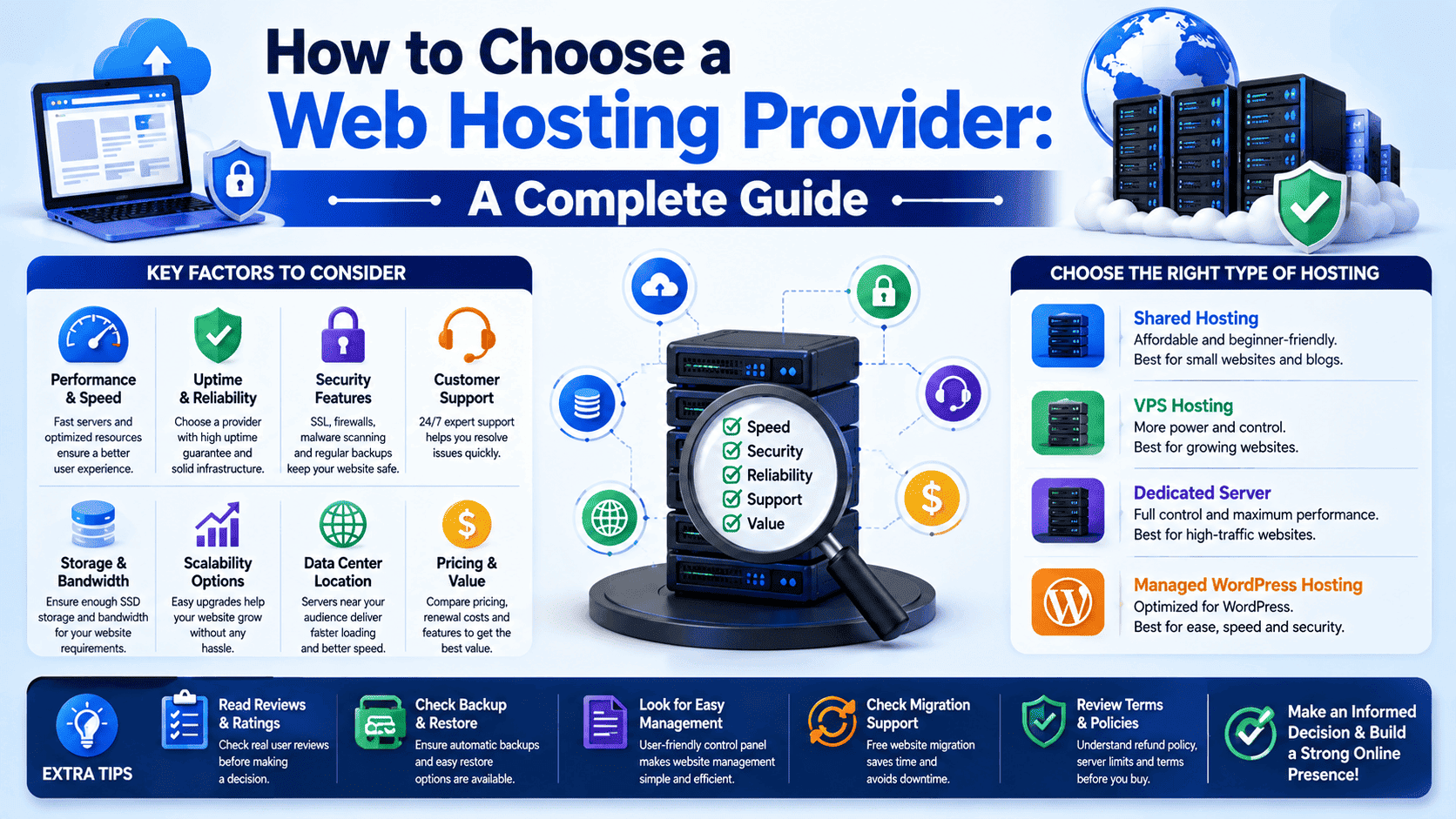
2. Choose the Right Type of Hosting
Hosting providers usually offer several hosting environments.
Shared Hosting
Shared hosting is affordable and easy to manage. Multiple websites use resources on the same physical server.
Best for: Blogs, portfolios, small business websites, and new websites.
VPS Hosting
A Virtual Private Server provides an isolated virtual environment with allocated resources and greater control.
Best for: Growing websites, developers, e-commerce stores, and applications that need more resources.
Dedicated Server
A dedicated server provides an entire physical server to one customer.
Best for: High-traffic websites, demanding applications, large databases, and businesses requiring extensive control.
Managed WordPress Hosting
Managed WordPress hosting is specifically optimized for WordPress and can include maintenance, backups, security tools, caching, and WordPress-focused support.
Best for: Businesses, bloggers, agencies, and website owners who want less technical maintenance.
3. Check Server Performance
Website speed has a direct impact on user experience. A hosting provider should offer an infrastructure capable of handling your website’s workload efficiently.
Look for features such as:
- Modern server hardware
- SSD or NVMe storage
- Adequate CPU and RAM
- Fast network connectivity
- Server-side caching
- Content Delivery Network (CDN) support
- Optimized PHP configurations
Don’t judge performance solely by advertised storage or bandwidth. The underlying server architecture and resource allocation also matter.
4. Look at Uptime and Reliability
A website that frequently becomes unavailable can hurt your visitors, reputation, and business.
When comparing providers, examine their uptime commitments, infrastructure, monitoring systems, redundancy, and maintenance policies.
A reliable provider should have systems designed to minimize downtime and respond quickly when infrastructure problems occur.
5. Examine Security Features
Security should be one of the first things you evaluate—not an optional extra.
Useful hosting security features can include:
- Free SSL certificates
- Web application firewalls
- Malware scanning
- DDoS protection
- Account isolation
- Secure server configurations
- Regular security updates
- Two-factor authentication
- Automated backups
Remember that hosting security is only one part of website security. You should also keep your CMS, plugins, themes, applications, and passwords secure.
6. Check Backup and Restore Options
Backups can become extremely valuable when something goes wrong.
A good hosting provider should offer reliable backup solutions and, more importantly, a straightforward way to restore your website.
Before purchasing a plan, find out:
- How frequently backups are created
- How long backups are retained
- Whether backups are stored separately
- Whether database backups are included
- How restoration works
- Whether restoration costs extra
A backup feature is much more useful when restoring a website is simple and fast.
7. Evaluate Customer Support
Even experienced website owners can encounter unexpected hosting problems.
Look for providers that offer support through channels such as:
- Live chat
- Support tickets
- Phone support, where available
- Knowledge bases
- Tutorials and documentation
Also consider when support is available and whether the support team understands technical hosting issues.
Fast and knowledgeable support can be more valuable than a small difference in monthly pricing.
8. Check the Control Panel
A good control panel makes hosting easier to manage.
Depending on the provider, you may get tools for:
- Managing domains
- Creating email accounts
- Managing databases
- Installing applications
- Managing SSL certificates
- Creating backups
- Monitoring resource usage
- Managing files
- Selecting PHP versions
For beginners, an intuitive control panel can significantly reduce the learning curve.
9. Consider Scalability
Your hosting requirements may change as your website grows.
A website that works perfectly on shared hosting today might need a VPS in the future.
Before choosing a provider, check whether you can easily upgrade to:
Shared Hosting → VPS → Dedicated Server
A provider with a clear upgrade path can save you the trouble of migrating your website to another company when your traffic increases.
10. Compare Resource Limits
Don’t focus only on the amount of disk space advertised.
Check the actual limits for:
- CPU usage
- RAM
- Storage
- Inodes
- PHP workers
- Concurrent processes
- Database size
- Number of websites
- Email accounts
- Databases
- Network usage
Two hosting plans can advertise similar storage while providing very different levels of processing capacity.
11. Check Data Center Locations
The physical location of your hosting server can influence network latency.
If most of your visitors are located in India, for example, having a suitable data center location in or near India may help provide a better network experience for those visitors.
For websites serving visitors across multiple regions, a CDN can help deliver static content closer to users.
12. Review Pricing Carefully
Hosting prices can sometimes be confusing because introductory rates may be significantly lower than renewal prices.
Before purchasing, compare:
- Initial price
- Renewal price
- Setup fees
- Domain registration or renewal fees
- Backup costs
- Migration charges
- SSL costs
- Additional IP costs
- Resource upgrade costs
Always calculate the long-term cost, rather than choosing a provider solely because of its first-year promotional price.
13. Check Migration Assistance
If you’re moving an existing website, migration support can make the process much easier.
Some hosting providers offer free website migration, while others may charge for it or provide only limited assistance.
Ask whether the provider can help migrate:
- Website files
- Databases
- Email accounts
- DNS records
- SSL configuration
- WordPress installations
A smooth migration can save significant time and reduce the risk of downtime.
14. Look for a Clear Refund Policy
A refund policy gives you an opportunity to evaluate the service without committing to it indefinitely.
Before purchasing, check:
- Refund eligibility
- Refund period
- Products covered by the policy
- Any setup or domain-related exclusions
- Cancellation procedure
Make sure you understand the terms before placing your order.
15. Consider Server Management
Not every hosting customer wants the same level of technical responsibility.
With managed hosting, the provider may handle many server administration tasks.
With unmanaged VPS or dedicated hosting, you may be responsible for tasks such as:
- Operating system updates
- Server configuration
- Security hardening
- Software installation
- Firewall configuration
- Monitoring
- Troubleshooting
If you don’t have server administration experience, a managed solution may be worth considering.
16. Read Reviews Carefully
Reviews can provide useful information about real-world experiences, but don’t rely on star ratings alone.
Look for recurring feedback about:
- Support response times
- Server reliability
- Performance
- Unexpected charges
- Migration experiences
- Backup reliability
- Resource restrictions
Try to identify patterns rather than making a decision based on a single positive or negative review.
A Simple Hosting Selection Formula
You can simplify the decision by prioritizing five major factors:
Performance + Reliability + Security + Support + Value
Price matters, but it shouldn’t be the only factor.
A slightly more expensive hosting provider that delivers better reliability and support may provide significantly better value over time.
Common Mistakes to Avoid
Choosing Only Based on Price
The cheapest plan may have restrictive resource limits or expensive renewal pricing.
Buying More Resources Than You Need
A powerful dedicated server isn’t necessary for every website. Paying for unused resources can waste money.
Ignoring Renewal Prices
Always check what you’ll pay after the promotional period ends.
Overlooking Backups
A hosting plan without a reliable recovery strategy can become a serious problem when data is lost.
Not Checking Resource Limits
“Unlimited” hosting does not necessarily mean unlimited CPU, RAM, or server resources.
Ignoring Support Quality
When your website is down, fast access to knowledgeable support can make a major difference.
Which Hosting Provider Is Right for You?
There isn’t one hosting provider that is perfect for every website.
A beginner launching a simple blog may prioritize simplicity and affordability. A growing business may need better performance and scalability. A developer may prioritize server control and customization, while an enterprise website may require dedicated resources, advanced security, and high availability.
The best provider is the one that matches your technical requirements, budget, expected traffic, and future growth.
Final Checklist Before Buying Hosting
Before placing your order, ask:
- Does the plan provide enough CPU and RAM?
- Is the storage suitable for my website?
- What uptime commitment does the provider offer?
- Are SSL certificates included?
- Are backups included?
- How easy is restoration?
- What security features are available?
- Is customer support available when I need it?
- Can I upgrade later?
- Where are the data centers located?
- What are the renewal prices?
- Are there hidden or additional charges?
- Is website migration supported?
- Does the hosting environment support my required software?
If the answers meet your requirements, you’re much more likely to make a good hosting decision.
Conclusion
Choosing a web hosting provider isn’t simply about finding the lowest monthly price. It is about finding the right balance between performance, reliability, security, support, flexibility, scalability, and cost.
Start by understanding your website’s requirements, compare hosting types, examine resource limits, investigate security and backup features, and carefully review pricing and support.
Most importantly, choose a provider that can support your website today and as it grows tomorrow. A good hosting partner should make it easier—not harder—to keep your website fast, secure, reliable, and online.